The ultimate guide to dialog pictures in visual communication
1. Introduction to dialog pictures
Definition of dialog pictures
A dialog picture is a large-format visualisation that depicts complex corporate situations, strategies or change processes in a single, detailed scene – often similar to a hidden object picture. Unlike a simple infographic that presents data, the dialog picture invites the viewer to discover connections and talk about them. It acts as a ‘map’ for discussions.
The importance in visual communication
For designers and communication professionals, visual communication is their daily bread. But walls of text and PowerPoint battles hardly reach employees and customers today. Images are processed by the brain 60,000 times faster than text. This is where the dialog picture comes in: it creates a common understanding and synchronises the knowledge of all those involved.
Difference between dialog pictures and traditional images
While a stock photo often serves only as a decorative placeholder and a photograph captures a moment of reality, a dialog picture is a constructed reality. It condenses time and space.
- Traditional image: Shows what is (e.g. a photo of the office).
- Dialog picture: Shows what is happening, why it is happening and where the journey is headed (e.g. the process of digitisation in the office).Note for creatives: A dialog picture does not have to be photorealistic. An illustrative style is often more effective in making the abstract tangible.
2. Practical application of dialog pictures
Designing dialog pictures
Creating a dialog picture requires planning. Before drawing the first line, the picture dialog must be defined. What story do you want to tell?
- Choose a scenario: Build a world (e.g. city, factory, landscape) that serves as a metaphor for the topic.
- Define scenes: Break down the complex topic into individual scenes.
- Use characters: Use characters to convey emotions and actions.
Integration into marketing campaigns and change management
Marketing professionals are increasingly using dialog pictures for storytelling. Instead of listing product features, a dialog picture shows the ‘customer journey’ in a single overview. However, the format is particularly powerful in change management:
- Onboarding: New employees immediately understand the company structure.
- Strategy Rollout: All departments see their contribution to the greater picture.
Examples of Successful Dialogg Picture Use
Imagine a logistics company optimizing its supply chain. A text document would be 50 pages long. A dialog picture depicts the chain from raw material to end customer as a road, where obstacles (old processes) and accelerators (new software) are visually represented. This greatly promotes visual dialog between management and employees.
3. Image Editing Techniques for Dialog Pictures
Fundamentals of Image Editing
Whether you're a photographer isolating elements or an illustrator, solid image editing techniques are essential. A dialog picture often consists of hundreds of individual elements. Clean file structure (layer management) is crucial here.
Specific Techniques for Dialog Pictures
To create a coherent dialog picture, perspective and lighting must be consistent.
- Composing: When using photographic elements, pay meticulous attention to shadows and color temperature to prevent the elements from appearing "pasted on."
- Vectorization: Working with vectors is indispensable for scalable dialog picture (e.g., for large wall prints).
Image Editing Tools
The following tools are typically used to create professional dialog picture:
- Adobe Photoshop: For compositing, digital painting, and final editing.
- Adobe Illustrator: For vector graphics and typographic elements.
- Procreate (iPad): Popular for quickly sketching initial ideas.
4. Interactive Images and Their Role
What are interactive images?
In the digital world, the dialog picture comes to life. Interactive images (clickable maps) allow users to click on individual scenes within the image to access more detailed information (videos, text, links).
Advantages of Interactive Images
Digitizing an interactive image increases engagement and comprehension.
- Layered Information: The main image remains clear, with details displayed only on demand.
- Gamification: Users can complete tasks or search for elements within the image.
Improving the User Experience (UX)
For web designers, this means: The dialog picture is the interface. Intuitive navigation within the image (zoom, pan, click) is crucial. Interactive images transform passive viewing into active exploration.
Implementation tip: Use HTML5 or specialized tools to overlay hotspots on your dialog picture. Ensure that the interaction also works on mobile devices (responsive design).
5. Graphic Design Tips for Dialog Pictures
Color Selection and Composition
Color psychology plays a huge role. Use colors for coding:
- Green: Future goals / Positive aspects.
- Red: Problems / Pain points.
- Blue: Existing infrastructure / IT. These graphic design tips help the viewer to immediately orient themselves within the busy image.
Typography for Dialog Pictures
Less is more. A dialog picture should speak for itself. If text is necessary (e.g., for section headings), choose a clear, sans-serif font. Ensure high contrast with the background.
Effectively Utilizing Visual Hierarchy
How do you guide the viewer's eye through an image with 50 scenes?
- Size: The most important element is the largest.
- Flow: Use roads, rivers, or arrows in the image to establish a reading direction (usually from top left to bottom right or cyclically).
- Focus: Use sharpness/blur (in photographic approaches) or saturation to direct the viewer's gaze.
6. How the agency DIALOGBILD can support you
As a designer or project manager, you might be asking yourself: "Do I have to do all this alone?" The answer is: No. Creating a high-quality dialog picture is often a team effort.
This is where DIALOGBILD agency comes in. We see ourselves not just as illustrators, but as process facilitators.
- Consulting & Workshops: We work with you to develop the content. Our consultants help reduce complexity before the drawing begins.
- Scribbles & Final Artwork: Our specialized illustrators implement various styles – from cartoons to high-end 3D effects.
- Interactive Implementation: We deliver not only the visuals, but also the technical solution for interactive visuals on your intranet or web.
So, if you have a project that exceeds the scope of your internal resources or requires specialized expertise in visual strategy consulting, we are your partner.
7. Summary and Outlook
Key Findings
A dialog picture is a powerful tool in visual communication. It helps break down silos and make complex relationships understandable for everyone. Whether through analog posters or interactive images, the key lies in a clear structure, good storytelling, and technically sound execution, taking graphic design tips into account.
Future Developments in Visual Communication
The future will be even more immersive. We are already seeing trends toward Augmented Reality (AR) and Virtual Reality (VR), where you can literally step into the dialogue image. Nevertheless, the core competency—distilling information concisely—will always require human creativity.
Start the Dialogue!
Harness the power of images for your projects. Whether you are a designer looking to expand your skills in image editing techniques or a marketing professional seeking better ways to communicate, the dialog picture is your key to understanding.
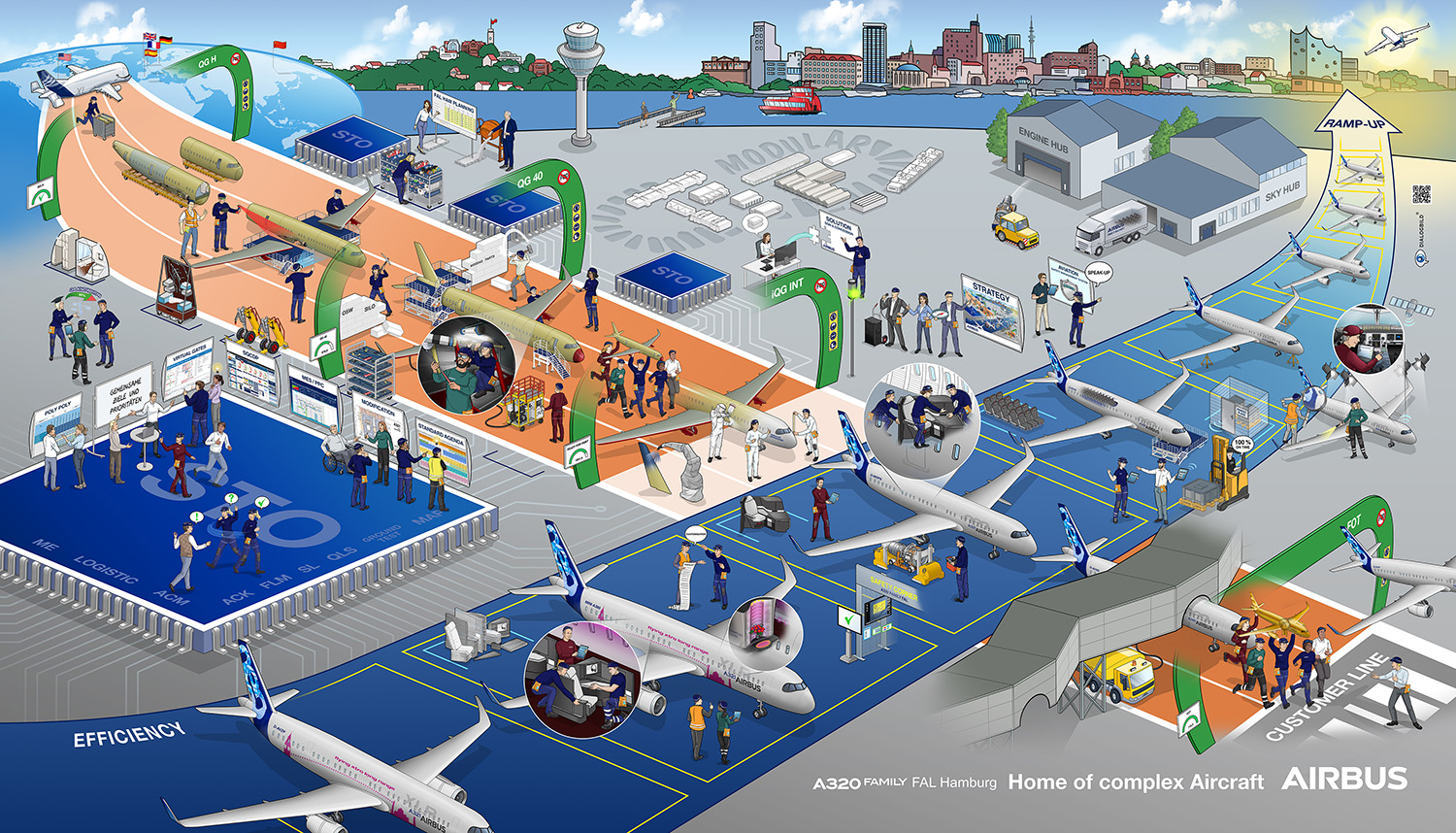
A DIALOG PICTURE FOR AIRBUS AND THEIR NEW MODULAR CONCEPT
The Airbus plant in Hamburg-Finkenwerder is the largest Airbus site in Germany. Among other things, this is where the final assembly of the well-known A320 family takes place. As part of an internal restructuring, sequential line production is being converted to a mixed production organization, with the first half of production taking place in a synchronized area and the second half at a modular station. This means that various activities per aircraft that currently take place at several stations will be carried out at a single station.
The new modular concept is to be made visually understandable to production employees with the aid of a dialog picture, and the advantages and opportunities for all those involved are to be highlighted.
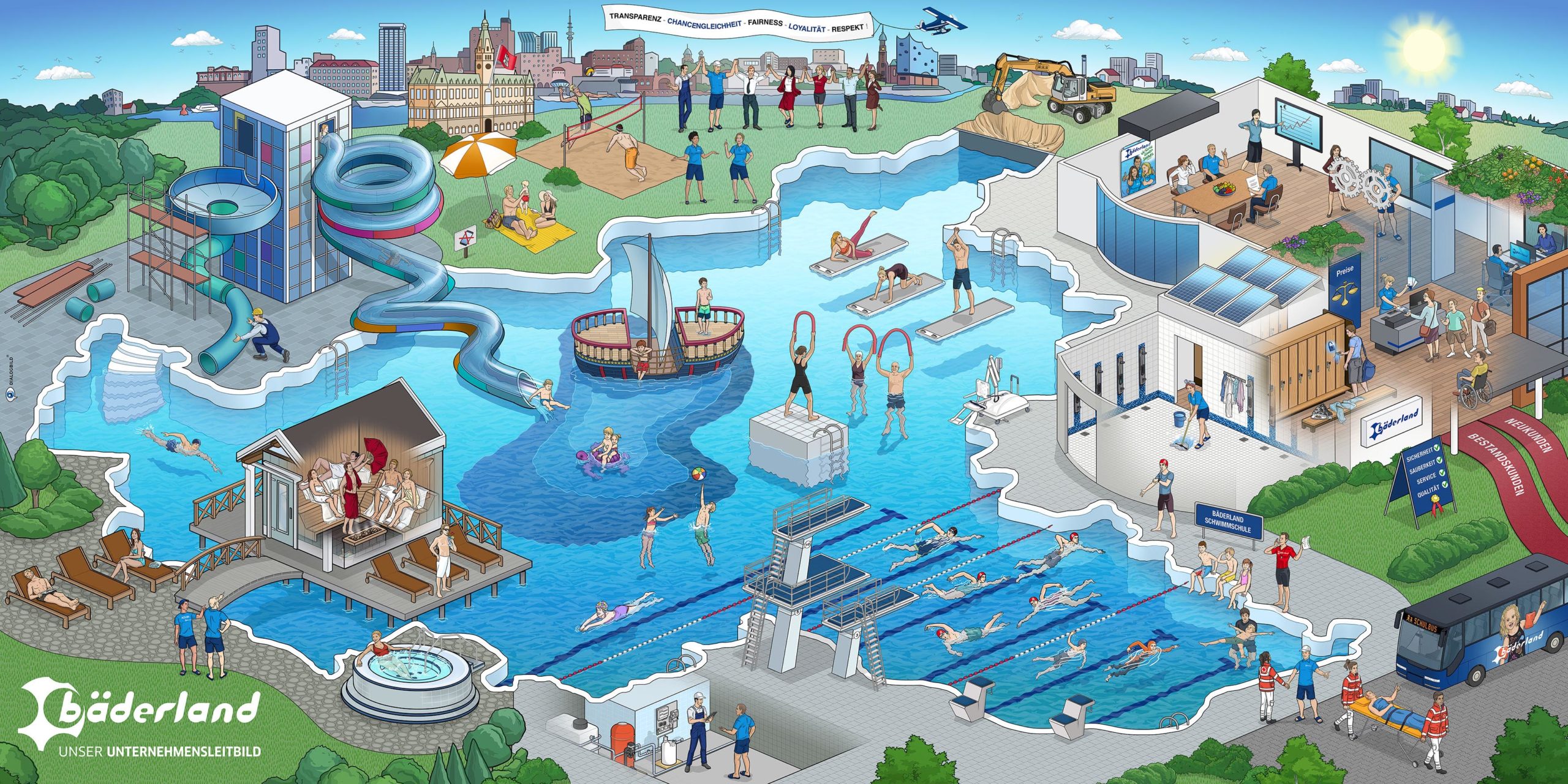
OUR MISSION STATEMENT
Bäderland is the urban swimming pool operator in Hamburg with a broad offer of services in the fields swimming, fitness, wellness and relaxation. With 26 indoor and outdoor pools, Bäderland is Germany‘s largest and Europe‘s second largest swimming pool operator. To communicate the newly revised company mission and the future company goals to the employees and to create a common understand, Bäderland decided on the development of a dialog picture.
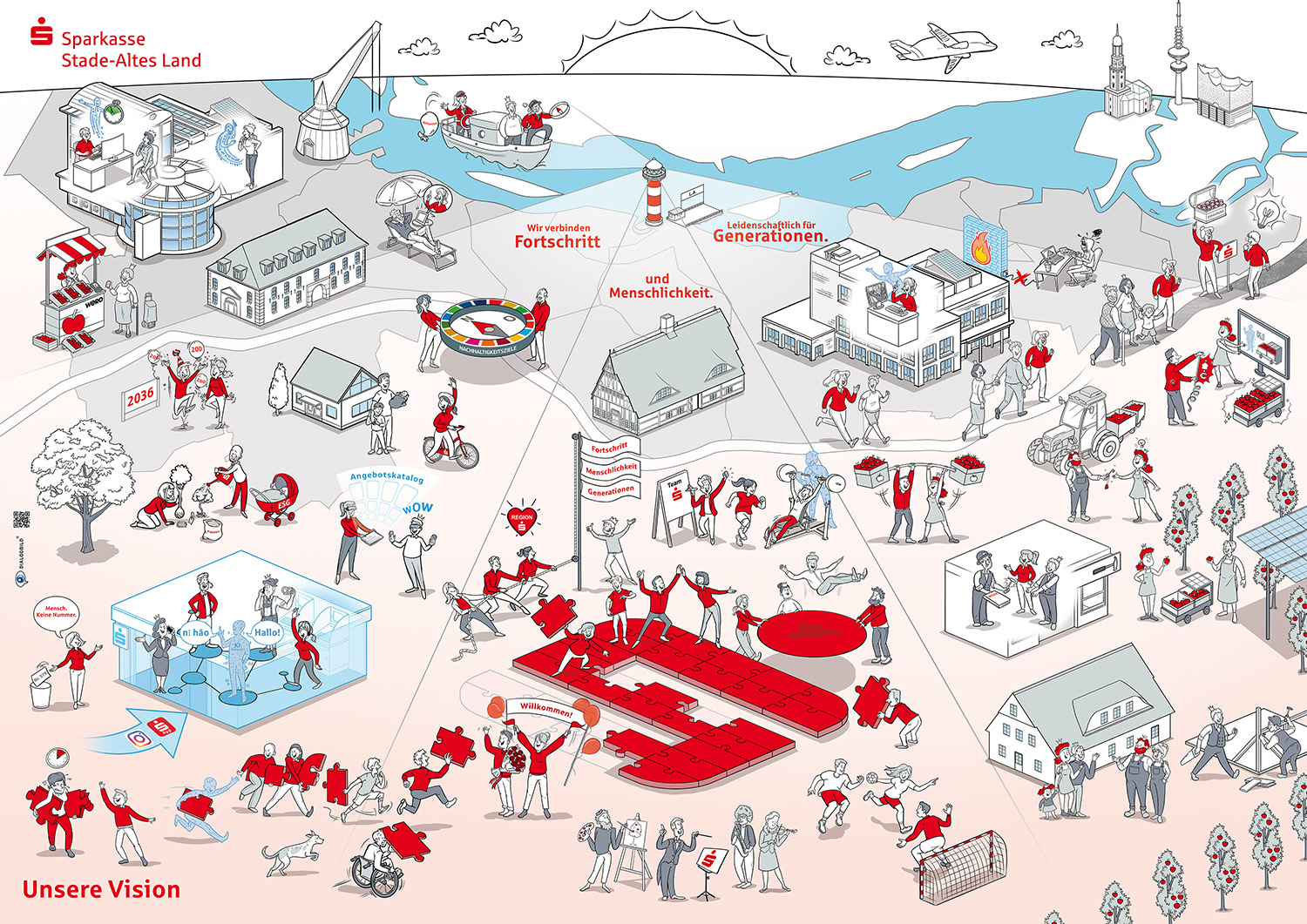
OUR VISION
Sparkasse Stade-Altes Land is a public savings bank based in Lower Saxony. Its business area covers the Hanseatic city of Stade and the Alte Land region in the district of Stade, as well as the Hamburg districts of Finkenwerder and Neuenfelde.
To visualize its vision for the future, “We combine progress and humanity. Passionate for generations,” Sparkasse Stade-Altes Land turned to DIALOGBILD.
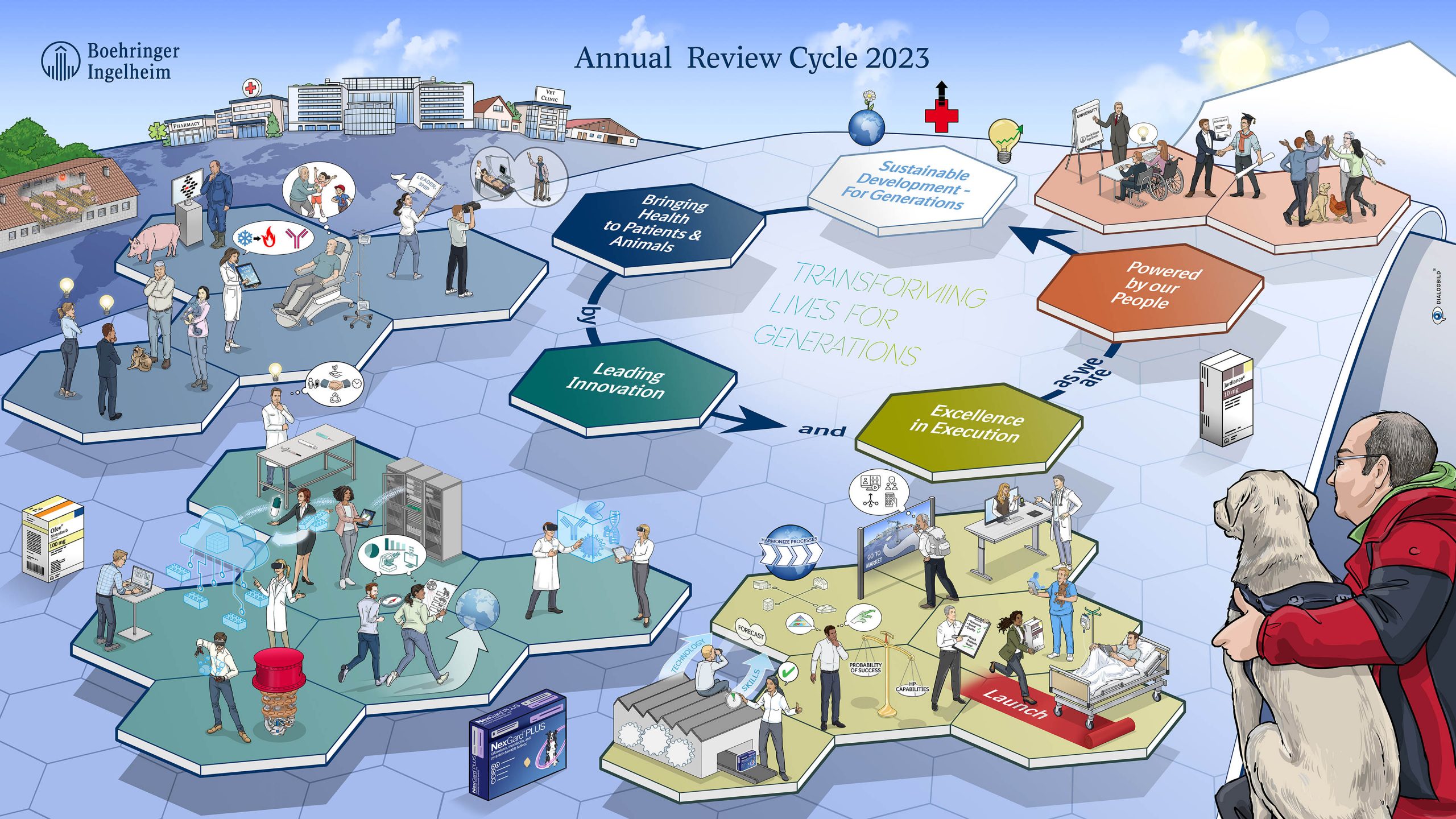
ANNUAL REVIEW CYCLE 2023
Boehringer Ingelheim develops breakthrough therapies that change lives - today and for future generations. As a leading research-driven biopharmaceutical company, Boehringer Ingelheim creates value through innovation in areas of unmet medical need. Since its foundation in 1885, Boehringer Ingelheim has been family-owned and pursues a long-term, sustainable perspective. More than 53,000 employees serve over 130 markets in the two divisions Human Pharma and Animal Health.
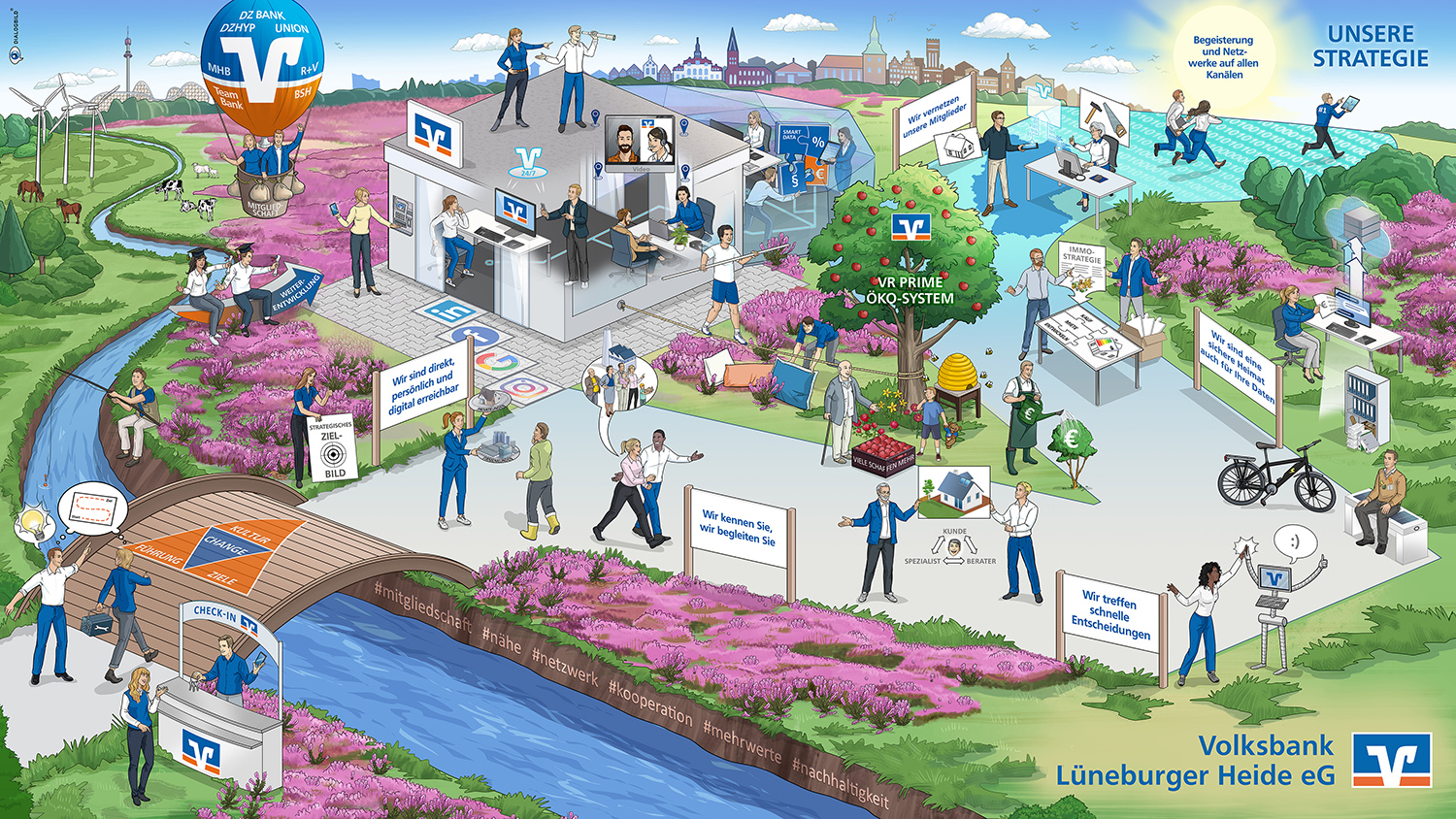
OUR STRATEGY
ENTHUSIASM AND NETWORKING ON ALL CHANNELS
With around 163,000 customers, more than 550 employees and total assets of around 4 billion euros, we are one of the largest cooperative banks in Germany. Our core business area consists of the districts of Harburg, Lüneburg and Heidekreis and covers an area of approximately 4,800 km². With 39 branches and 26 self-service locations (as of December 31, 2021), we have a strong presence in the area. For us, however, customer proximity also means being there for our members and customers outside branch opening hours. This is ensured by the almost 40 employees in our in-house DialogCenter. They can be reached by phone, e-mail, chat or video service from what are now 13 branches. Thanks to the consistent expansion of digital service offerings, we are available to our members and customers 24/7 and even outside our business territory.
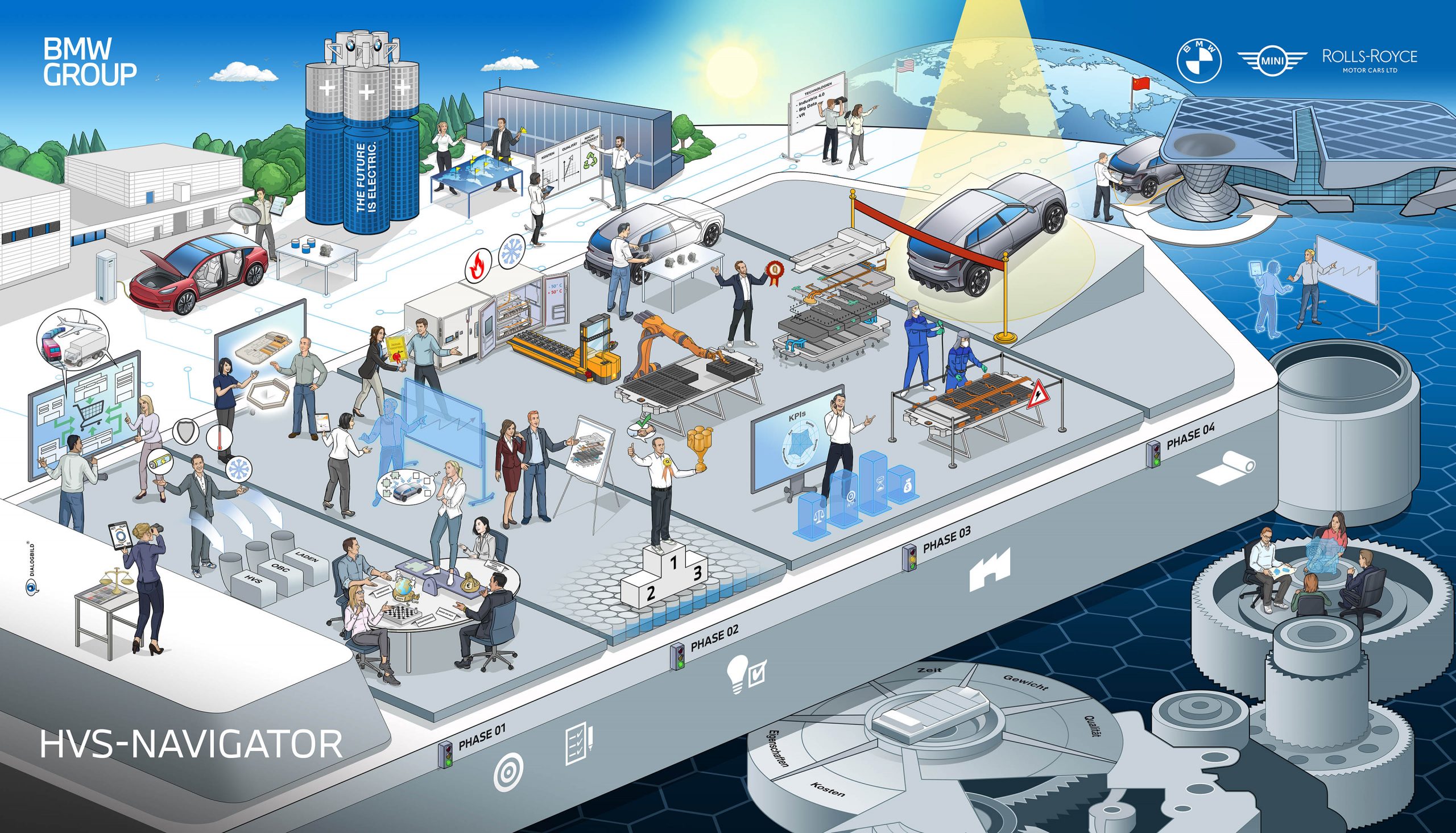
E-DRIVE DEVELOPMENT
THINKING ABOUT TOMORROW'S OPPORTUNITIES
With 31 production and assembly plants in 15 countries, the BMW Group is today one of the world's leading premium car manufacturers. The BMW Group is responding to the current age of electric mobility with clear and forward-looking visions of electric cars that are already thinking about the possibilities of tomorrow. The processes along the way are complex and require coordinated and targeted development steps. ...
Frequently Asked Questions (FAQ) about Dialog Pictures
What is the precise difference between a dialog picture and an infographic?
While an infographic typically serves to present data, figures, and facts linearly and clearly, a dialog picture focuses on context and narrative. A dialog picture visualizes complex relationships, processes, and human interactions in a scenic representation (often as a busy, detailed illustration). The goal is not merely to convey information (as with an infographic), but to foster exchange—that is, a visual dialogue between viewers.
In which areas of a company are dialog pictures most effective?
Dialog pictures are extremely versatile, but they truly shine in situations where complexity affects many employees. The top application areas are:
- Change Management: To reduce anxieties about change and illustrate the path "from the current state to the desired state."
- Strategy Communication: To make the company's vision tangible for everyone.
- Onboarding: To playfully explain the company structure and values to new employees.
- Compliance & Security: To translate dry rules into understandable, everyday situations.
How long does it take to create a professional dialog picture?
The duration depends heavily on the complexity of the topic and the desired level of detail. A typical project at DIALOGBILD agency goes through several phases: briefing, workshop/concept development, sketching, final artwork, and coloring. Generally, you should expect a timeframe of 4 to 8 weeks for a high-quality, custom dialog picture. Simpler visualizations can be completed more quickly.
Can a dialog picture also be used digitally and interactively?
Absolutely. In the age of remote work and intranets, this is even a growing trend. A static dialog picture can be transformed into an interactive image (clickable map). Employees can click on individual scenes on the screen to open videos, PDFs, detailed texts, or links. This increases engagement time and allows for deeper immersion in the content.
What information is needed to create a dialog picture?
To create an Effektive dialog picture, we (or your design team) need the core content. This means:
- What is the core message?
- Who is the target audience?
- Which metaphorical world fits the theme (e.g., construction site, sports stadium, jungle, futuristic city)? In our workshops, we help you structure this information and translate it visually.
Is the effort invested in a dialog picture worthwhile compared to text documents?
Studies on visual communication show that the brain processes images 60,000 times faster than text. A dialog picture ensures that strategies are not only read but also understood and remembered. The "Total Cost of Misunderstanding" in companies is often far higher than the investment in professional visualization. Furthermore, the image can be used as a "map" of the company for years to come.
Get info package